

Agentic Coding for Non-Vibe Coders
A workflow for building real things (not demos) with AI coding agents

Part 2 of 3 in my Essays on Agentic Coding — see also Part 1: The Dopamine Trap of AI Coding and Part 3: Iron Man Suit, Not Jarvis (coming soon)
I’ve been hearing this a lot over the last few months - “human in the loop” or another version “human out of the loop”, signifying the progress in autonomous agentic coding and how it’ll either reduce humans into a smaller role or take them out entirely. I don’t like these phrases because I don’t think we’re anywhere close to that point, and secondly, I think that we (humans) should be at the center of the proverbial loop, not on the edge of it, doing the grunt-work for sloppy coding agents.
In Part 1 of this series, I wrote about the subtle dopamine trap of AI coding: you feel productive, but you end up reinventing the wheel at a microscopic scale, building something that won’t survive a month, and not gaining any real understanding in the process.
I’m writing this for non-vibe coders: people who want to build useful things, keep their expertise sharp, and not disappear into terminal TikTok mode while pretending that motion equals progress.
If you only take three things from this post: you must call the shots on what gets built and how, keep your setup boring enough that you can actually stick with it, and never stop solving the puzzles yourself.
YOU must call the shots
Agentic coding tools can generate code at lightning-fast speed, something that humans just cannot do if you’re measuring output purely in units of time. But the weights of the neural networks powering these models are affected by three things - 1) your prompts, 2) model’s context limits, and 3) the changing codebase itself.
What this means is that if you really don’t want to do any “hand-coding” at all, then it’s a long game of trial and error, trying to optimize these three highly variable components (prompts, context, codebase). If we think that the agent can self-optimize, then I think we’re lying to ourselves.
If you’re not calling the shots on the product vision, tech stack, architecture, trade-offs etc., then you’re putting yourself in a position where you’ll be accountable for outcomes when you don’t fully understand how they’re being generated. This is truly unsettling for me. Especially at work, I’m not putting Claude or Codex’s name on work that I’m presenting to executives, because if something goes wrong, I get fired, not these agents.
A human-centric agentic workflow
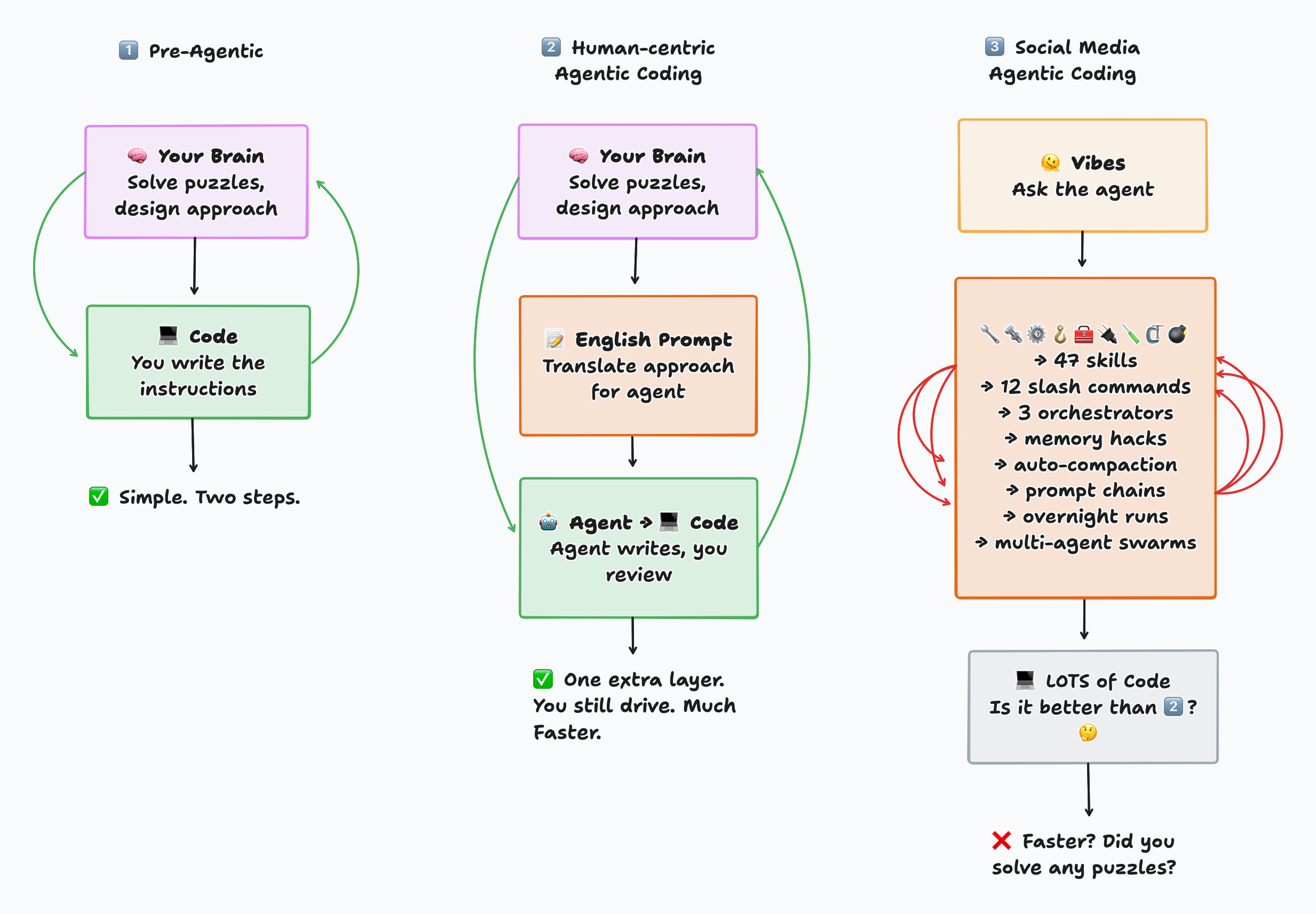
Your workflow with agentic coding will also be limited by your brain’s ability to handle a fixed amount of cognitive load. On social media, you’ll see posts about using every single skill, slash command, memory hack, multi-agent flows, and extremely complex setups that are great at generating views online, but there’s no way you can keep track of all of those things while you’re trying to build something.
Think about it - traditional programming or data science requires only two tools - 1) your brain - that solves puzzles and comes up with an approach to a problem, and 2) a programming language - that translates that approach into machine-readable instructions. Now with agentic coding, I’d rather think of having just one additional layer - translating my approach to English prompts for an agent who will then translate it to programming languages.
It's worth continuously asking yourself - if you aren't building something that will still work in one month, then why did you build it? Was it just the dopamine trap?
The setup and coding loop
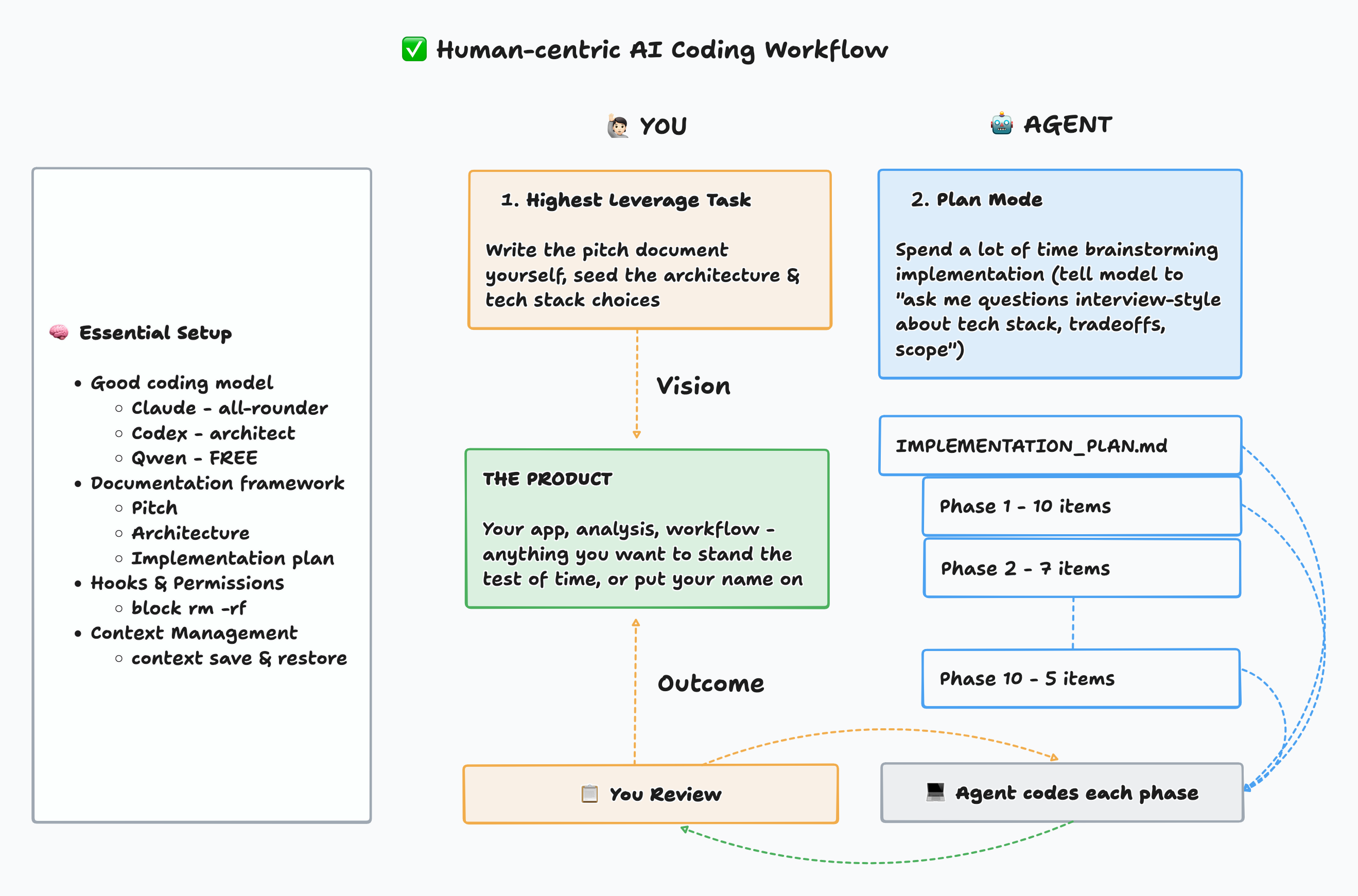
In my opinion & experience, these are the essentials for building working products or analyses without boiling the entire ocean of settings, configs, plugins, skills, tools that are apparently being shipped on a daily basis:
A good coding model - as of 3/7/26, my top 3 are:
Claude Opus 4.6 (Med) - most expensive, but best all-round model, fast coder and great as the primary implementer
Codex 5.3 (High) - $20 plan is more than enough, loves to over-engineer, best use as an architect / code reviewer
Qwen 3.5 Plus Coder - FREE tier with 1M context window is very generous, more creative than Claude or Codex, great for pushing the boundaries, but not to be used by itself without Claude or Codex review
Documentation - this is my bread & butter - all my context management, implementation plans, architecture & product vision live in three documents, and I continuously point the agents to work off of the docs so there is minimal drift
PITCH.md: product sense + sales pitch document, best to write this one down in your own words as the north star vision docARCHITECTURE.md: tech stack, components, principles such as DRY, KISS, YAGNI, also good to write top-level architectural guardrails in your own words at the top, ask agent to build diagramsIMPLEMENTATION.md: phased implementation checklist, ask agent to work on one phase at a time, each phase ending with unit testing, integration testing and live user (you) testing, before moving to next phase; even better to log each phase as a github issue for traceability
Guardrails - Highly recommend taking the time to set this up. Permissions and hooks to block destructive commands (no rm -rf). You can see mine here. Think about where you want the agent to fail while running a command. Don’t do --dangerously-skip-permissions. It’s the dopamine calling, not your brain.
Context Management using Slash Commands - these are just shortcut prompts to address the context window issue, which is VERY IMPORTANT. I use just two - /context-save and /context-restore - absolutely awesome at keeping the agent workflow consistent. You can see mine here: context-save, context-restore. Basic idea is:
Context save - at the end of a session, the agent reads your recent changes, current state, and open tasks, then writes a structured snapshot to a handoff file so the next session picks up exactly where you left off
Context restore - at the start of a new session, the agent reads that snapshot and reconstructs full working context — what was being built, what’s pending, key decisions, so you can skip the “where were we?” ramp-up entirely
The workflow is simple: Write your pitch doc yourself — that’s the highest leverage task and it should come from your brain. Then use plan mode to brainstorm the implementation with the agent (”ask me questions interview-style about tech stack, tradeoffs, scope”). Once a plan is documented, execute one phase at a time — small enough that you can check the work, test the product, give specific feedback, and update the docs before moving on.
What I’ve tried but haven’t found useful
Claude.md / Agents.md or similar “instructions” file - the agent very quickly drifts away from this, which is why my approach is to just keep pointing the agent back to the pitch, architecture and implementation plan documents
Skills & specialized sub-agents - seems like Anthropic merged them into skills anyways, but those are just prompt collections and way over-engineered for daily use. Unless you specifically invoke them as a slash command, they don’t even get used.
MCP servers - just use battle-tested API endpoints or CLI interfaces for the tools you want to integrate with. These MCP servers take a lot of space in context which is not efficient at all.
Multi-agent workflows or Agent Teams - coding models will already use parallel tool calls or multi-agent workflows where it makes sense for codebase exploration type tasks, but specifically setting up 10 agents to work on a codebase in parallel has been beyond me. I don’t understand how they patch things together. Yes, it’s faster, but more expensive and breaks my one phase at a time workflow.
I haven’t tried unattended agentic flows like Ralph Wiggum - just not my style to be flying blind all the time. I definitely won’t use anything like that at work! Maybe I’ll try it one day, but in a more intentional, explainable and traceable way.
Optional & over-kill: have models review each other’s work
Sometimes, for complex projects, I’ve had multiple models validate each other’s work. It definitely takes more time if I’m coordinating the conversations myself. I know there are tools out there that could potentially automate the handoffs, but I haven’t tried those yet.
As I mentioned earlier, based on my very subjective experience, I can see the different models having particular strengths and weaknesses. I’ll copy that here again:
Claude Opus 4.6 (Med) - best all-round coding model, fast coder and great as the primary implementer
Codex 5.3 (High) - loves to over-engineer, best use as an architect / code reviewer
Qwen 3.5 Plus Coder - more creative than Claude or Codex, great for pushing the boundaries, but not to be used by itself without Claude or Codex review
Workflow:
For complex issues, ask one model to review the other model’s work
Ask the reviewer to log review in
model_review.mdAsk the coder to read the review file, and assess what to keep vs not
Repeat the loop as long as needed
You can run the same pattern with two instances of the same model too. The role separation (coder vs reviewer / architect) seems to help catch bugs, issues and document drifts, but again I can’t prove that I can’t just solve this using prompting alone.
My Dogfooding results
I’m not a professional content creator, so these workflows and setups that I’m sharing here, are the same approaches I’ve been applying to my own personal and work projects. When I’ve actually applied the workflows and used agentic coding as a multiplier of my own existing comp sci, data science and engineering background, then the results have been awesome. Some examples:
Portfolio site: Home • Eeshan S.
Fully self-hosted Astro site, with a Supabase backend for building interactive data science apps (such as the one below), with Posthog analytics — all wired together and hosted on Fly.io. I played a very heavy role in choosing the tech stack, backend choices, frontend component structure etc. It’s been running flawlessly for almost 4 months now, without any downtime and CI/CD pipelines that run tests + run Python notebook scheduled jobs.
A/B Testing Simulator: A/B Testing Memory Game • Eeshan S.
The first project I hosted on my portfolio site was nearest to my passion, experience and daily work. Zero-backend orchestration and powered by Supabase PostgREST APIs, JS charting libraries and a Python notebook that runs on a schedule. It was a super fun build that took me months to get right.
How I Prompt: How I Prompt: Dashboard
One of my most fun sidequests - where I’m using NLP to analyze my own conversation patterns based on the local conversation storage for Claude & Codex. A v2 with some fun updates is coming soon.
Several projects at work: hybrid of deterministic (traditional Python & ML) + LLM approaches have been working just fine. The end result being that my team and I got recognition for getting things done faster, and building new data science prototypes.
At the same time, every time I got lazy, I switched to being a true vibe-coder and thought that one-shotted apps or prompting-only apps would still work, but I learned my lessons. Some examples:
Quizzrd (Kahoot-style app): eeshansrivastava89/quizzard: Real-time quiz app for live events
I didn’t want to pay for Kahoot for a seminar I led at UCLA recently, but it hilariously broke during the presentation when ~100 students logged in at the same time. My Supabase free tier got shocked with those concurrent connections, but it worked enough to have the students laugh through the whole thing.
Local LLM benchmark tooling: Local LLM Benchmark Report
One of my passion projects to build towards fully local LLM workflows, using on-device models. So I wanted to have my own benchmark for my specific use cases (knowledge management bots). But this is a far more complicated topic that just cannot be accomplished using vibe coding. What I have right now is probably 5% of what it should be.
Shameless Plug
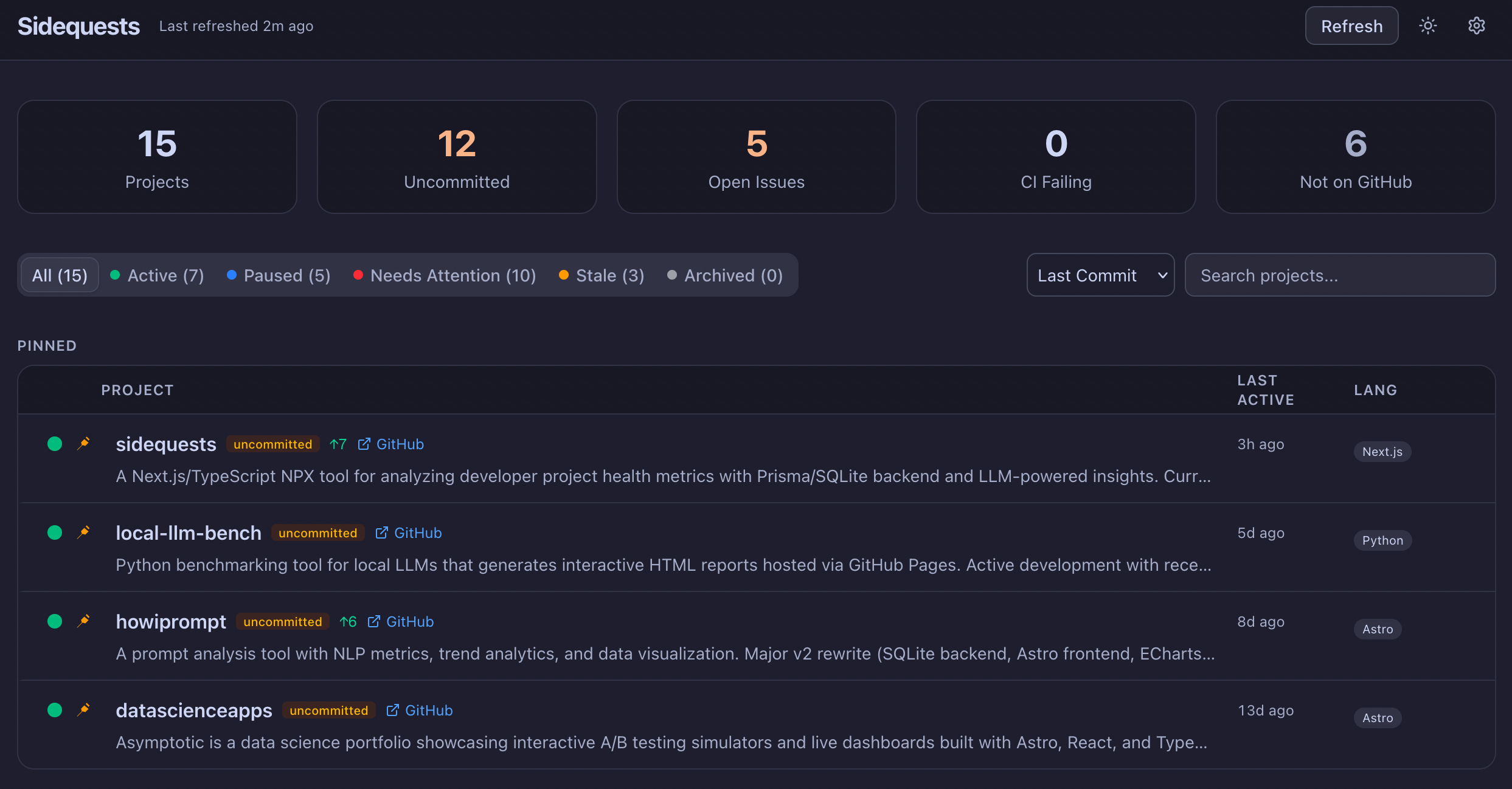
If you’re a nerd like me, and have been spawning too many sidequests since the dawn of good agentic models, then you might like this app I made - eeshansrivastava89/sidequests. It’s a dashboard for solo devs to track progress of work across multiple repos. It’s packaged in a single npx command, and leverages your local Claude or Codex CLI to enrich project descriptions, summaries and adds insights about where you were and what you should do next. Try it out and let me know if you like it.
Final take
One thing I won’t sugarcoat: if you don’t have any background in software engineering, data science, or a related technical field, you will struggle building something that lasts. You will ship a lot of demos and one-shotted apps that either reinvent a fraction of the wheel or only solve a problem that you have.
That’s not a permanent blocker. I believe anyone can learn anything if they focus, especially if you’re early in your career. Get skilled in the fundamentals of computer science, programming, statistics, and system design. AI is not yet at the stage where you can treat it like a car, and just operate it without understanding how it works. There’s no service center when it breaks down. It’s on you to diagnose issues, fix them, and take all the blame when something goes wrong.
Agentic coding is autocomplete on steroids. It is not a replacement for thinking. And you need to keep getting the mental reps in, which programming enables you to do, by constantly solving puzzles. Otherwise, we’re one generation away from the squishy, boneless, consumerist humans from Wall-E — letting machines do everything while we sit in floating chairs and watch.

I refuse to end up in that chair. I’m a senior data science manager. I don’t have time to code like I used to. And yet I’ve shipped more side projects in the last few months than I had in years — a portfolio site with CI/CD, an A/B testing simulator, open source tools. The ones that actually stuck around weren’t the ones I built the fastest. They were the ones where I stayed in control, made the hard choices myself, and didn’t let the agent completely take the wheel.
Read the other parts in my Essays on Agentic Coding:
Part 3: Iron Man Suit, Not Jarvis (coming soon)